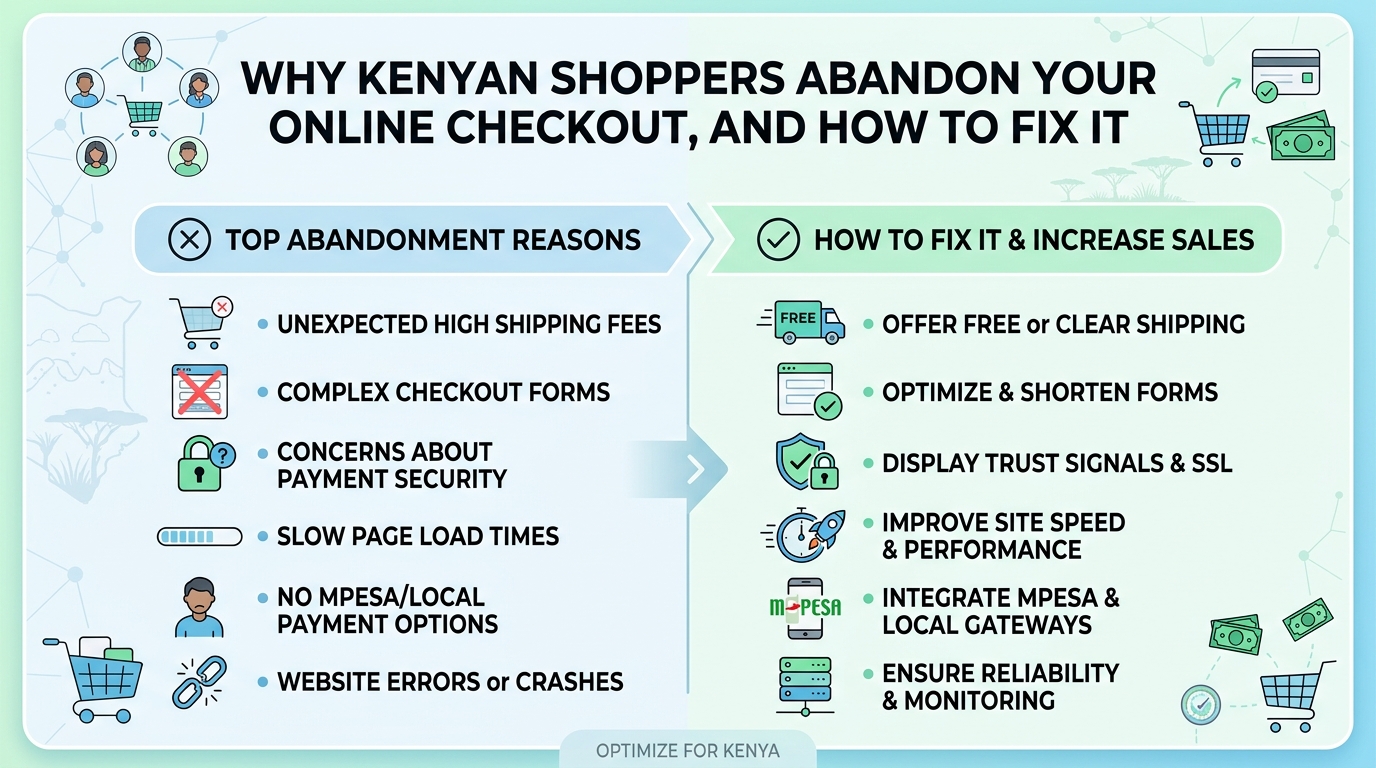
Many Kenyan businesses that move online see the same pattern. People visit the store, browse products, add items to the cart, and then simply leave. The traffic is there and the interest is real, but the orders never arrive. Usually the problem is not the products or the prices. It is what happens between "Add to cart" and "Order confirmed".
This post covers the most common reasons shoppers in Kenya and the wider region give up at checkout, what each one costs you, and the practical changes that fix them.
Why checkout is where most online sales are lost
By the time someone reaches checkout, they have already decided they want what you sell. Every extra step, unclear charge or failed payment from that point gives them a reason to change their mind. Unlike a physical shop, there is no attendant to answer a question or reassure them. A shopper who hesitates simply opens another tab, or goes to a seller on WhatsApp or Instagram they already trust.
Fixing checkout is often the fastest way to grow an online store, because you are converting people who are already interested rather than paying to attract new visitors.
The most common reasons shoppers walk away
1. Payment does not match how people actually pay
In Kenya, most people expect to pay with M-Pesa. If your checkout asks for card details first, or makes the shopper copy a paybill number, type an account reference and then come back to paste a confirmation code, many will not finish. Each manual step is a chance to make a mistake or get distracted.
The better approach is an M-Pesa STK push: the shopper enters their phone number, a payment prompt appears on their handset, they enter their PIN, and the store receives confirmation automatically. Cards, bank transfers and other mobile money options can still be offered for those who prefer them, but the default should be the method your customers use every day.
2. Surprise costs at the last step
Delivery fees that only appear at the end feel like a trick, even when they are fair. Shoppers in Nairobi, Kisumu and a small town upcountry face very different delivery costs, and they want to know early what they will pay.
Show delivery options and estimated charges on the product page or the cart, based on location. If you offer pickup points or free delivery above a certain order value, say so clearly before checkout begins.
3. Being forced to create an account
Asking a first-time buyer to register, confirm an email address and set a password before they can pay is one of the quickest ways to lose them. Most shoppers just want to buy.
Allow guest checkout with only a name, phone number and delivery location. You can invite them to create an account after the order is confirmed, when they have a reason to want one, such as tracking the delivery.
4. Long, confusing forms
Forms that ask for a postal code, a second address line and a county, then reject input because of formatting, frustrate people on mobile phones. Ask only for what you genuinely need to deliver the order. Use dropdowns or location search for towns and estates, and allow plain-language directions, which many riders depend on anyway.
5. Slow pages on mobile data
Most of your customers are shopping on a phone, often on mobile data that is not always fast or cheap. Heavy images, large scripts and pages that reload between every step make checkout feel broken. A lightweight, mobile-first checkout that keeps the shopper on as few pages as possible makes a noticeable difference.
6. Lack of trust
Online fraud is a real worry, and shoppers are cautious about paying a business they do not know. Signs that build confidence include:
- A clear business name that matches the name shown on the M-Pesa prompt
- Visible contact details and a physical location where relevant
- A simple, readable returns and refund policy
- Order confirmation sent immediately by SMS, not only by email
- A secure site (the padlock in the browser) on every page
7. Payments that go through but orders that do not
This is the most damaging failure. The customer pays, the money leaves their account, but the store does not register the order because the payment confirmation was missed or arrived late. The customer then has to call, send screenshots and wait while someone checks statements by hand. Even if it is resolved, that customer is unlikely to return.
A properly built payment integration listens for the confirmation from the payment provider, matches it to the correct order automatically, and has a fallback for when a confirmation is delayed, such as checking the transaction status before telling the customer anything has failed.
Recovering shoppers who still leave
Even a well-designed checkout will not convert everyone. Some people get interrupted, run out of airtime or decide to wait until payday. You can bring many of them back with simple follow-up:
- Save the cart so it is still there when they return.
- Send a polite reminder by SMS or WhatsApp if they gave their number and agreed to be contacted, with a direct link back to their cart.
- Retry failed payments easily, letting them resend the M-Pesa prompt with one tap instead of starting over.
- Review where people drop off using your store's analytics, so you know which step needs attention next.
Be respectful with reminders. One or two well-timed messages help; a stream of them damages your brand.
What a good checkout looks like in practice
Put together, a checkout that works for Kenyan shoppers tends to look like this:
- Cart shows the full cost, including delivery, before the shopper commits
- Guest checkout with phone number, name and delivery location only
- M-Pesa STK push as the first payment option, with cards and others available
- Automatic order confirmation by SMS the moment payment is received
- Back-office alerts so your team can pack and dispatch without checking statements
- Stock updated automatically so you never sell something you no longer have
None of this is exotic technology. It is careful design and a reliable link between your store, your payment provider, your SMS service and your inventory.
Should you fix your current store or rebuild?
Not every store needs to start again. Sometimes the answer is adding a proper M-Pesa integration and simplifying the checkout form. In other cases, especially where the store was assembled from several plugins that do not talk to each other, a cleaner build saves more trouble over time. The right choice depends on your volume, how you handle stock and delivery, and how much your team currently does by hand.
Talk to Glomex about your online store
At Glomex Technologies we build online stores and e-commerce platforms with M-Pesa payments, SMS notifications and inventory management built in, and we integrate payment gateways into existing websites and systems. If shoppers are reaching your checkout and not completing their orders, or payments are arriving without matching orders, get in touch. Tell us how your store works today and where it is falling short, and we will help you work out the most practical way to fix it.
Share this post
Know someone who'd enjoy reading Why Kenyan Shoppers Abandon Your Online Checkout, and How to Fix It?